





 Sign in with Google
Multiple forms of measurement have emerged for iOS App campaigns, including conversion modeling and SKAdNetwork. SKAdNetwork helps app advertisers measure their ad activity, such as impressions, clicks, and app installs, on an aggregated level and
has become increasingly important to app advertisers in assessing their iOS campaign performance.
Setting up your SKAdNetwork conversion value schema is especially important to measure in-app event performance and more effectively optimize campaigns for post-install actions or a target return on your ad spend. Your schema is a means to designate which in-app events or buckets of in-app revenue matter to your business.
This guide provides an overview of:
01 Best practices to set up your schema
02 Integrating your schema with Google Ads for optimization
Set up your schema for in-app event measurement
Today, you can set up your SKAdNetwork conversion value schema for in-app event measurement through Google Analytics, a third-party App Attribution Partner, or the Google Ads API. It’s highly recommended that advertisers choose one place to set up their conversion value schema. Conversion value schemas set up through Google Analytics can be exported with the Admin API. After configuring your schema, it will then need to be integrated with your Google Ads account for campaign optimization, more on that below.
While Apple supports two versions of SKAN today, version 3 and 4, Google’s conversion modeling only uses the fine conversion values from each for measurement and campaign optimization. We currently do not support SKAN version 4’s coarse conversion values.
A fine conversion value in your schema refers to a numerical value of 0 to 63 which is sent to ad networks to represent specific user actions within a mobile app. Data for these values can only be sent if the highest privacy threshold is met. By assigning fine conversion values to different in-app events, you can gain more nuanced insights on user behavior and campaign performance. These insights can enable more effective optimization strategies within the privacy constraints of SKAN.
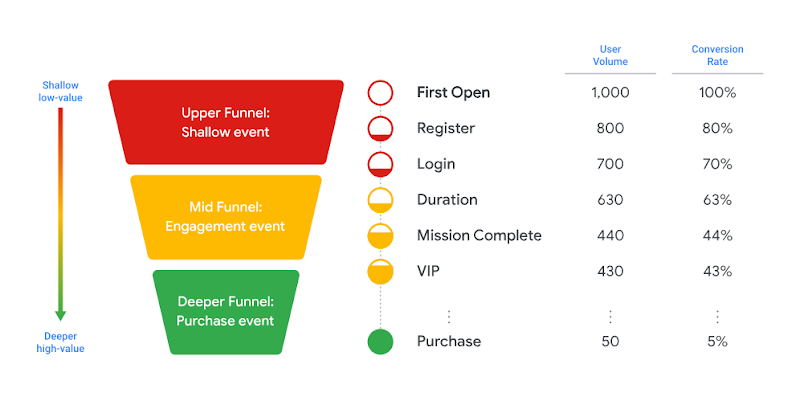
The conversion value (CV) fields you include in your schema will be highly specific to your business and app. You should ensure that these values represent the in-app events you plan on optimizing your App campaigns for and that these events are also present as biddable conversion events within your Google Ads conversion settings.
Watch the video below to get a walk through of an example schema design:

Integrate your schema with Google Ads for campaign optimization
After you’ve set up your SKAdNetwork conversion value schema, you’ll need to integrate your schema events with your Google Ads account in order to enhance the performance of tCPA and tROAS bidding. Currently, this event integration is available in beta. Reach out to your Account Manager to learn more.
Ensure that you have set your conversion value schema to the appropriate measurement mode specific to your App Attribution Partner.
| Partner | Modes |
| Adjust
|
Custom |
| Airbridge
|
Revenue, Event, and Number of order complete |
| AppsFlyer
|
SKAN 4.0, Custom, Revenue, Conversion, Engagement, Decode |
| Google Analytics
|
Custom |
| Kochava
|
Revenue, Highest value event, Engagement, User journey |
| Singular
|
Revenue, Conversion events, Engagement funnel, Mixed models |
Map your events with Google Ads
As mentioned, today in beta, we offer the ability to utilize your SKAdNetwork schema to improve the optimization of your CPA and ROAS App campaigns. If you are utilizing a third-party App Attribution Partner for SKAdNetwork conversion value schema setting, but bidding on Google Analytics in-app events, it will be critical that the in-app event names set up through your partner align with your Google Analytics in-app event names. As part of this beta, you’ll need to directly map your Google Analytics event names to their third-party event names within the Google Ads interface.
This mapping is important and Google requires it since your events may have different naming conventions. For example, you should ensure your “in_app_purchase” event in your third-party partner interface aligns to “purchase_one” in Google Analytics. Without mapping the events to each other, Google won’t be able to determine which SKAdNetwork conversion values tie to your partner events and Google Analytics events and we won’t be able to calibrate our models effectively.
If you aren’t in this beta, you can still prepare for this step by mapping your events in the Google Ads interface and making sure all your events, both in Google Analytics and your App Attribution Partner, have already been added as conversion events in Google Ads.
