Sign in with Google
 Imagine this: you’ve invested heavily in driving traffic to your app. You’ve run marketing campaigns, created a real buzz, and watched download numbers climb. Then, silence. People open your app once or twice, before disappearing without a trace. This scenario isn’t due to bad luck, it’s because of a lack of post-download strategy.
In the Middle East’s hyper-competitive market, this oversight could be an expensive mistake. While global app growth crawled at 0.5% year over year in Q2 2025, the Middle East surged ahead at 2.6% for the same period. And in-app spending rose in the region too, reaching $700 million USD during the same timeframe, with the United Arab Emirates (UAE) leading the charge at 26% revenue growth.
In collaboration with marketing agency, Incubeta MENA, and user-experience (UX) optimisation agency, Call To Action Digital, we ran in-depth UX and user interface (UI) audits and A/B tests to get to the root of this problem. The studies ran across a range of websites and apps, spanning the health and wellness, airlines, and financial technology industries for brands based in the United Arab Emirates (UAE), Saudi, and internationally. We found that people often leave apps and websites for the same, predictable reasons. To ensure that brands can tackle these challenges head on, we’ve turned our insights into an actionable roadmap to boost retention and build long-term app loyalty:
1. Bridge the gap between ad and app
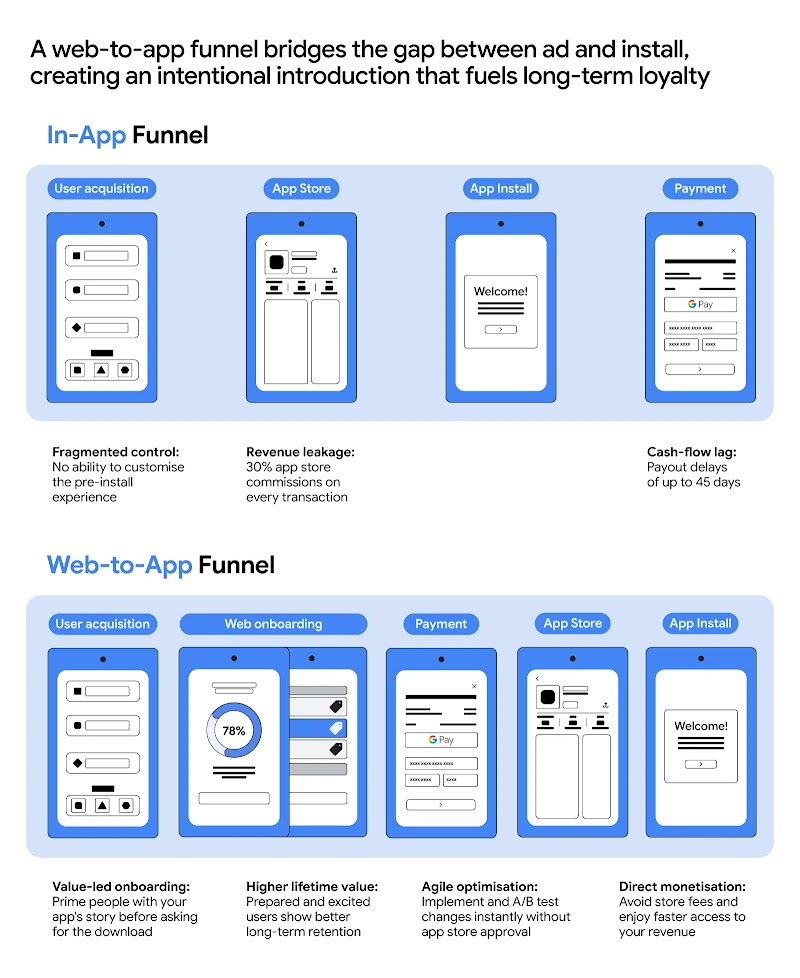
Just like with websites, the secret to a great app introduction is focusing your efforts on the first and last screens of your funnel. This means creating narrowly targeted landing pages that speak directly to people’s needs and pain points, and high-converting checkout screens with easily recognisable payment options and strong trust signals. Treating the top of the funnel as a brand storytelling exercise rather than just a technical hurdle can help marketers pre-qualify leads and lower their customer acquisition cost before a single megabyte is downloaded.
“Not to mention that a sudden redirect from an ad to the app store can feel like a forced context switch, catching a person off guard and forcing them to transition from the engaging narrative of an ad to a download they might not know they want yet,” says Anna Potanina, founder of Call To Action Digital. “You’re asking them for a high commitment before they’ve seen any value, which can lead to abandonment.”
Potanina suggests a smoother web-to-app funnel. Instead of a sudden jump, you guide people through a simple, web-based introduction first. This “bridge” allows for a customised introduction and deeper personalisation, both drivers of a higher customer lifetime value. By layering your value proposition across a few screens, you create a “try-before-you-buy” feel that builds trust. This intentional journey ensures people are sold on the app before hitting install, which makes for a stronger long-term connection. And data confirms that those who convert through web-to-app ‘bridges’ demonstrate significantly higher trial-to-paid conversion rates than those who land directly on a native app store paywall.
This web-first approach also bypasses the ‘black box’ of app store attribution, giving marketers granular data on which specific hooks are resonating before people enter the operating system’s walled garden. It provides a far more flexible sandbox for A/B testing, giving marketers the data they need to optimise faster. And it allows for faster payouts, bypassing the strict limitations of the App Store and significantly improving cash flow by avoiding the ‘platform tax’ on initial conversions.
2. Polish your app’s entry points
First impressions are everything. Your app’s first few screens are a golden opportunity to deliver on your ad’s promise, yet many brands immediately overwhelm users with onboarding “interrogations” or a long list of tasks. This friction doesn’t just annoy people. It creates a ‘leaky bucket’ in your marketing funnel, where expensive, high-intent traffic is lost before the first conversion event even triggers.
“The goal is to get people to your app’s core value as quickly as possible, but not faster than they’re ready for,” explains Daleen Spence, client service director at Incubeta MENA. “Whenever you can, skip onboarding screens, and let the product speak for itself.”
Context matters, of course. In health or finance, a few background questions are actually expected to build trust. The trick is to ask only for what’s essential, then load the first meaningful screen immediately. You can always use progressive onboarding, like subtle nudges or progress bars, to encourage people to finish their profile later without slowing them down — or putting them off — at the start of their app journey. By saving the data collection for later, marketers can get users to the ‘Aha!’ moment faster. This keeps more people in the app on their first day, which is the clearest sign that your marketing is hitting the mark.
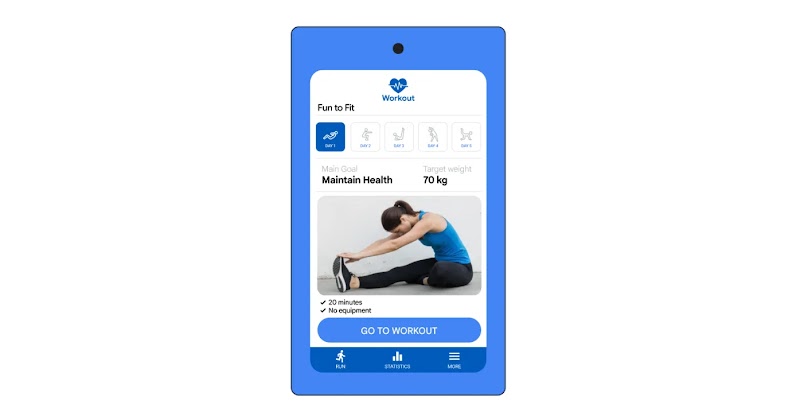
Once that first screen loads, simplicity remains the priority. Spence suggests making one primary action ridiculously easy to begin with, for example starting a workout as soon as you log into a fitness app. Support this straightforward start with a clear sense of progress so people feel like they’re winning immediately.
The wellness app below allows users to easily begin their first workout as soon as they log-in, providing clear guidelines on workout duration and equipment needed:
While it’s tempting to show off every feature, a crowded interface can cause choice paralysis. In wellness apps, a cluttered screen can even trigger guilt or overwhelm that leads to inaction.
“From a conversion standpoint, every extra button is a distraction,” Spence says. “Highlight one key action on that first screen and ask yourself, what is the single most important thing I want people to do right now?”
3. Design a smooth digital experience and match real life
Your app isn’t just competing within its category. It’s being compared to the smoothest digital experiences available. Speed is non-negotiable as people have zero tolerance for lag, especially during critical moments like onboarding, booking, or payment. In the marketing world especially, lag is a budget-killer. If your app doesn’t load instantly, you’re essentially paying for clicks that never convert.
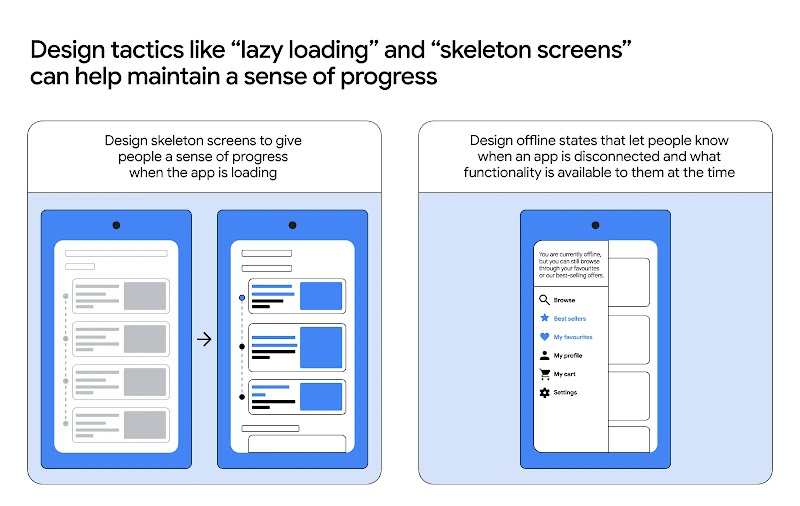
Sometimes, technical delays are unavoidable. In these cases, focus on perceived performance. Use these design tactics to make the app feel fast, even on slow networks:
- Skeleton screens and lazy loading: Display page outlines or partial content immediately so people see active progress.
- Instant feedback: Use microinteractions, animations, or haptics — tactile feedback that simulate a sense of touch through vibrations or motions — to confirm a tap was registered.
- Friction reduction: Pre-fill data and use clear progress indicators throughout someone’s online journey to keep them engaged.
It’s also important to design for real life. If you’ve ever juggled heavy groceries or a squirming child with a phone in hand, you know why the ‘thumb-friendly zone’ is essential. By placing large, easy-to-tap buttons at the bottom of the screen, you prevent errors and make one-handed navigation effortless.
Beyond physical ease, great mobile UX is about reducing mental effort. Stick to navigation patterns and gestures that feel familiar to a person’s phone’s operating system. For example, when you’re designing for Android, Google’s Material Design system lowers the learning curve, so people immediately know how to interact with your app as soon as they open it, building trust and connection straight away. You can still customise for your brand, of course, but keeping the underlying logic simple ensures people never have to overthink their next move.
Looking for advice on building a website that drives conversions? Read ‘Cracking the conversion code: 3 design secrets that make people hit ‘buy’’.