




 Sign in with Google
We know that consistent performance is key for your business, and scaling up to explore growth shouldn’t mean risking your ROI. This guide outlines the key steps you can take to safely measure the impact of AI Max, helping you test new growth opportunities with complete confidence.
Step 1: Set up your test the right way
Selecting the right campaign is critical to a successful AI Max test. To get reliable, actionable results, your candidate needs sufficient conversion volume and historical data to optimize efficiently, alongside a stable environment to isolate external variables that might affect your campaigns. Focus on these areas as you choose which campaigns to test:
- Define success: Before launching an experiment, it’s important to set clear objectives. Because AI Max is built to drive expansionary growth, relying on engagement metrics (like CTR or average CPC) can misrepresent its true value. Instead, anchor your evaluation in conversion volume and cost efficiency, such as conversions, conversion value, CPA or ROAS. For reference, our data shows that advertisers who adopt AI Max in Search campaigns see an average of 15% more conversions or conversion value overall on Search at a similar CPA/ROAS.1
- Prioritize campaigns with the biggest growth headroom: Once you’ve defined success, find campaigns with the greatest headroom for growth against the metrics you’re testing on. Focus on the campaigns targeting generic search intent (e.g., product categories or solution-based queries) or those rely heavily on Exact and Phrase match. Because AI Max excels in discovering new queries that traditional keywords often miss, that’s where you’ll see the most significant opportunity. You can also check your optimization score for specific AI Max recommendations.
- Align your budgets to demand: To fuel the growth that AI Max might unlock for you, make sure your budgets have enough breathing room or keep them uncapped to capture incremental demand without constraining AI Max’s potential during the test. Limited budgets might restrict your test results.
Step 2: Choose your testing method
Once you’ve determined which campaigns to test with, it’s time to determine how to test. Historically, setting up these experiments was a complicated practice reserved for the largest marketing teams only. But with AI Max experiments, and new Google Ads features, we’ve made sure customers of any size can get decisive conclusions before scaling adoption.
The biggest factor that’ll help you decide is whether your testing candidates have enough conversion data. You’re more likely to get a stronger test result if your campaign conversion volume meets our recommended thresholds. To choose the method that best matches your conversion volume and setup, consider using the decision framework below:
|
Your priority is: |
Recommended approach |
How it works |
Best if… |
|
Feeling confident before scaling. |
AI Max Experiments (Recommended) |
One-click experiment that splits the traffic and budget of your chosen campaign: half of it runs on AI Max, and the other half runs on original settings. If you require specific guardrails in AI Max, like brand or location settings, you can test with those controls enabled. At the end of the test, Google Ads presents a dedicated report that compares the two. |
- Your campaign has at least 50 monthly conversions. - You are looking for a conclusive recommendation, powered by a formal testing method. |
|
Scale first, confirm later. |
Pre vs. Post Comparison |
100% of your chosen campaign will run on AI Max immediately. At the end of the test, you’ll need to manually pull reports to compare results before and after you activate AI Max. |
- Your campaign has at least 20 monthly conversions. Consider other options if it doesn’t meet this threshold. - Campaigns are less subjective to seasonality or market shifts. |
-
AI Max Experiments (Recommended): For Search campaigns with at least 50 monthly conversions, an A/B experiment is the cleanest and most accurate way to measure the impact of AI Max. It divides traffic and budget evenly between your standard Search campaign and a separate AI Max test group—giving you a fair comparison with a simple setup and without duplicate campaigns.
- Check campaign eligibility before you start: Confirm your campaign runs on Search only (with Display Network off) and uses individual campaign budgets and bidding strategies rather than shared budgets or portfolio bidding.
- Test with more flexibility: If you rely on specific brand or location controls, you can now run tests with these settings enabled, letting you test the impact of AI Max without compromising those guardrails. What’s more, you can even test different budgets and ROI targets on one or across multiple Search campaigns in a single A/B test.
-
Pre vs. Post Comparison: For Search campaigns with 20-50 conversions, a 50/50 split might dilute the data that AI Max needs to optimize efficiently. If that’s the case for you, consider turning on AI Max directly in your live campaigns and compare performance across equal 30-day timeframes (30 days before vs. 30 days after turning on AI Max).
- Eliminate seasonality and promotional noise: We recommend running a pre- and post-test during business periods when you expect stable performance. Be mindful of how seasonality, external market variables, or other changes you make to your campaigns might impact your results. These variables can make it difficult to cleanly attribute performance lift to AI Max.
- Eliminate seasonality and promotional noise: We recommend running a pre- and post-test during business periods when you expect stable performance. Be mindful of how seasonality, external market variables, or other changes you make to your campaigns might impact your results. These variables can make it difficult to cleanly attribute performance lift to AI Max.
Step 3: Run and monitor your tests
Like testing any new strategy, once you turn on AI Max in your Search campaigns, it needs time to ramp up and stabilize performance. Here is what’s important to consider at each stage of your test:
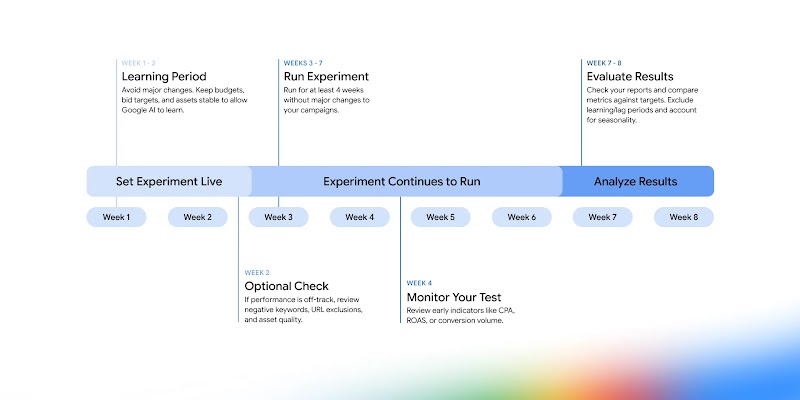
- Keep your campaign settings steady: To get a clean, reliable performance comparison from AI Max, avoid adjusting your campaign setup during the test window, such as bidding targets, landing pages, or adding new negative keywords as they may lead to fluctuations in performance. Only make changes if necessary.
- Monitor your campaign to ensure it is not limited by budget: If you see a “Limited by Budget” alert, increase your budget so your test isn’t held back.
- Allow time for conversion lags: Your customers may take a few days or weeks to decide and convert. Wait 7 to 14 days before pulling your final performance report. This ensures all delayed purchases or lead submissions are fully reflected in your final results.
Step 4: Evaluate your results, and scale
Evaluating your experiment results properly is just as crucial as launching the test itself. Before jumping to conclusions, remind yourself of the testing goals. Verify if the test met your success criteria: Did it meet the recommended volume? Were there any variables that may have influenced performance?
Once you are ready to review, we’ve made analyzing and acting on your AI Max experiments easier than ever. Simply head to the “Experiments” page to view a holistic, ready-to-use summary of your performance. If the data shows your campaign with AI Max enabled won, your final step is simple: roll out the campaign to fully capture your new growth opportunity.
- Exclude the estimated learning period: The estimated length of your learning period can vary based on a campaign’s conversion volume and budget. We recommend excluding the learning period from your report when evaluating results.
- Decide how you want to roll out winning results: During the initial setup in AI Max experiment, the setting for “Apply experiment to your original campaign if the treatment arm wins” is checked by default. Keep it enabled to roll out AI Max automatically when the experiment concludes, or uncheck it if you prefer to manually apply the changes on your own.
Ready to Get Started?
Testing AI Max gives you a controlled, low-risk environment to validate incremental growth before you scale. Start by deciding on your testing strategy following the tips shared in this guide, review these best practices as you continue to optimize your Search campaigns.
