



 Sign in with Google
Supercharge business growth with new app solutions for retailers
Official guide to help retailers reach more customers across their shopping journeys.
Who is this guide for?
This guide is best for retailers who have a mobile app and a Google Ads account. If you need help getting started with a Google Ads account, you can find more guidance here.

TL;DR: New app features to increase ROI
Improve your customer’s omnichannel experience by linking your app to your web campaigns with Web to App Connect
- Why:
- Apps are a critical tool for omnichannel success. That’s why it’s important to prioritise removing friction points for your customers when they interact with your web and app content.
- With Web to App Connect, you can easily establish in-app conversion measurement, bidding, and deep links to deliver a better shopping experience for your customers. Web to App Connect consolidates all these steps into a clear guide for you to implement, and improves the customer experience for users that already have your app and your overall web campaign performance.
- Conversion tracking and bidding helps you more accurately measure and optimise your campaign performance. You’ll be able to compare the performance of your app clicks vs. web clicks.
- Deep links help ensure that customers who already have your app installed land on the best in-app product pages when they click on your mobile ads. That way, if a customer who has your app sees your ad while browsing for a gift, rather than being directed to your mobile site, they will land on the most relevant in-app content where they can checkout faster.
Note
Web to App Connect is available on Android and iOS, and across all web campaigns, such as Search, Shopping, and Performance Max. Please contact your Account Manager for more information on how to access Web to App Connect today.
Find more valuable app users with App campaigns
- Why:
- Beyond helping you improve web campaign performance, apps help you increase customer lifetime value. Investing in your app can help you drive overall business success.
- App campaigns was built with AI at its core, helping you promote your app across Google’s largest properties, including Search, Google Play, Youtube, and more—all from a single campaign.
- You’ll be able to define the business goals that matter to you—whether that’s driving app installs, acquiring customers who will make an in-app purchase, or reminding shoppers to complete check-out. All you have to do is upload your creative assets, and App campaigns will build your ads, optimise your bids, and match them with high value customers.
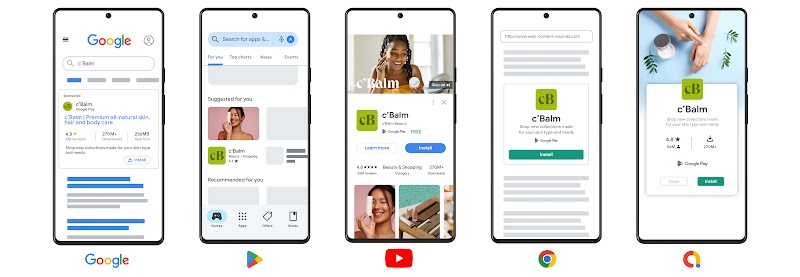
Learn more about how to set up App campaigns
Learn more about choosing a bid strategy for your App campaign
Make your ads more shoppable with product feeds
- Why:
- Adding product feeds from your Google Merchant Center or Business Data feed to your App campaigns enhances their targeting and format capabilities.
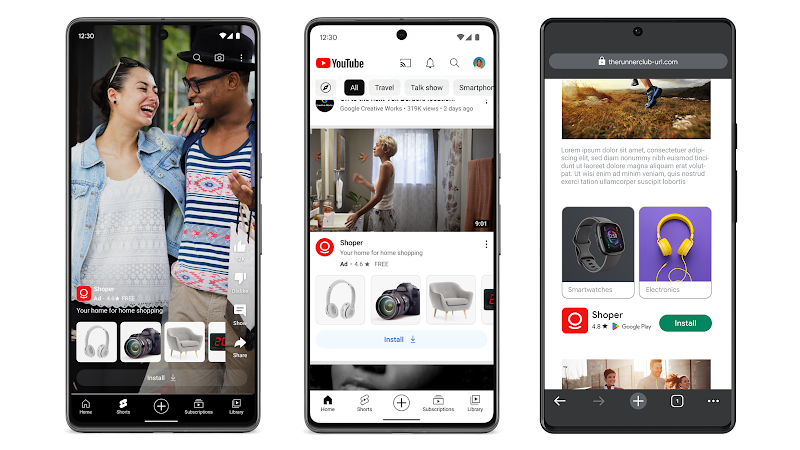
- Rich in-app product listing content, including product imagery, from your app makes your App campaigns more shoppable. This way, you’ll reach existing and potential app users more effectively.
- We’ve expanded our inventory for you to turn your ads into a storefront across more surfaces. You can now add your product feed to your App campaigns in YouTube Shorts, YouTube In-feed, and mobile Google Display Network banners.
Performance Insight
- On average, advertisers that add product feeds to their App campaigns achieve an 11% uplift in conversions.2
- On average, advertisers that add product feeds to their App campaigns achieve a 14% uplift in app installs.3
Let your customers know about your promotions with promotion assets
-
Why:
- Shoppers are constantly looking for the best deals online, and promotions are an effective way to boost sales by offering discounts or other incentives; to reach new customers who may not have been aware of a business or product before; and to build relationships with new and existing customers.
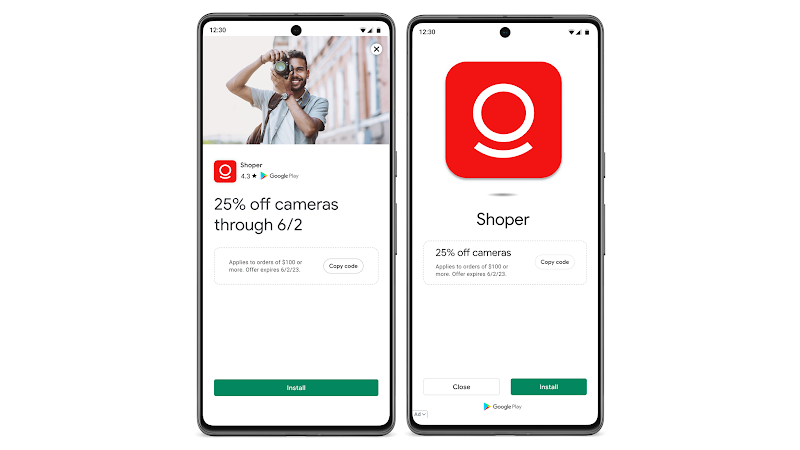
- With promotion assets for App campaigns, you can now easily let your customers know about your latest promotions, whether that’s $10 off a product or 20% off their next purchase.
- Powered by Google AI, promotion assets optimise how and when they appear in Display and YouTube formats to maximise results. This removes the need for you to manually apply your promotion details and custom creatives into each campaign you’re running.
- Promotion assets allows you to apply your promotional details according to your needs: at the ad group, campaign, or account level.
Note
Promotion assets for App campaigns will be available in the coming months. Please contact your Account Manager for more information on accessing the open beta version.
Note
If you create promotion assets at different levels (account, campaign, or ad group), the most specific will be used. So when you add promotion assets to an ad group, those assets show instead of your campaign- or account-level promotion assets. For instance, if you have a promotion attached at the ad group and account level, your promotion will be served more at the ad group level.
Promotion assets are also available for Search and Performance Max campaigns. Learn more here.
Capture moments of peak user demand with seasonality adjustments
-
Why:
- In key moments for your business, like seasonal promotions during critical holiday moments, or a release of exciting content on your app, you may expect higher conversion rates due to spikes in user demand. These spikes tend to disrupt campaign performance during and after promotional events because of the unexpected changes in conversion rates.
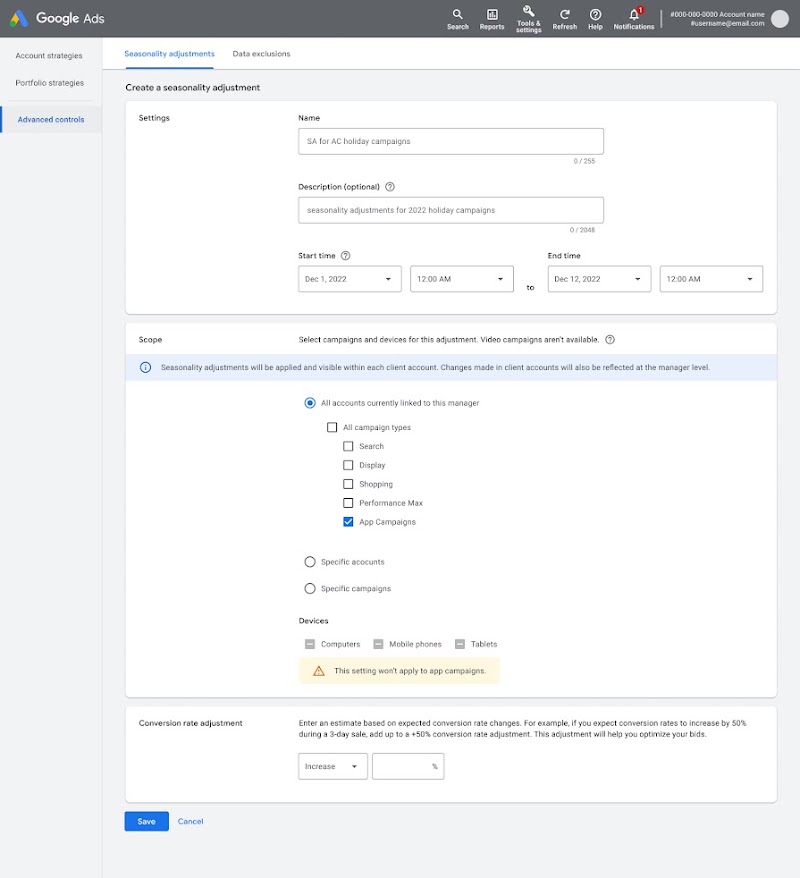
- Seasonality adjustments allow you to manage these moments by letting you inform your campaigns about these promotional cycles. Input details of the upcoming event and the conversion rate changes you’re expecting, and your campaigns will optimise bids during the events and return to their regular performance post-event. No negative adjustment is needed once the promotion is over.
Note
Seasonality adjustments will be available in the coming months. Please contact your Account Manager for more information on accessing the open beta version.
Seasonality adjustments are also available for Search, Display, Shopping, and Performance Max campaigns. Learn more here.
Note
This article will be updated to keep you informed on the latest App Ads best practises for retailers. Read about more ways to drive online and in-store sales with this retail best practises guide. This article was last updated on April 7, 2023.
