





 Sign in with Google
This guide offers Display campaign best practises for connecting customers with relevant ads across the web and apps. Get tips for setting up your campaign with effective ads, reaching the right audiences, and optimising for performance.
Set your Display campaigns up for success
- Set up conversion tracking to ensure you’re accurately tracking website and app conversions.
- We recommend that you check your conversion tracking regularly. You can also test conversion tracking by generating conversions and checking to see if they registered across Google Ads, Google Analytics, or your third-party platform.
- Select a campaign goal based on your objectives.
-
Use Smart Bidding to automate and optimise your bids.
- Dynamic bids tailored to each individual auction can lead to better results.
Tip
Display advertisers already using AI-powered features can now multiply results even further across channels with Performance Max. Advertisers who upgrade Google Display campaigns to Performance Max see an average increase of over 20% in conversions at a similar or lower CPA.1 This performance holds even if they have existing Performance Max campaigns. Performance Max will help you reach valuable audiences more effectively across channels—including Display and beyond.
Reach the right audience at the right moment
- Use optimised targeting to discover which customers are more likely to convert within your campaign goals.
-
Optimised targeting is a privacy-safe tool that can help you reach your highest-value audience. By looking beyond manually-selected audience segments, optimised targeting finds relevant new users to help meet your campaign goals.
- Add optional signals like audience segments or keywords when using optimised targeting.
Tip
To re-engage existing customers with optimised targeting, include audience segments built with your data, like previous site visitors or repeat buyers.
Create high-performing ads
- Upload and maximise your assets (images, logos, videos, etc.) into responsive display ads for automatically generated ad combinations.
Tip
Advertisers see 2x conversions, on average, when adding a responsive display ad to an ad group with a static display ad.2

By adopting responsive display ads, Bloomberg Media lowered their cost-per-action by 8% and cost-per-site-visit by 81%.
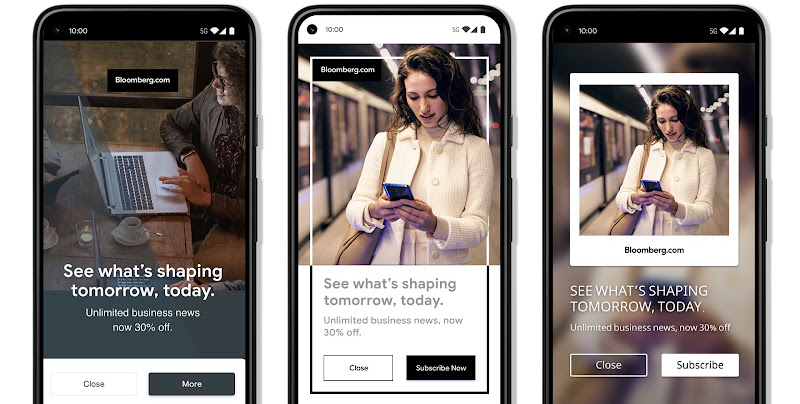
- Use advanced format options including asset enhancements, auto-generated videos, and native formats.
- Include your full catalogue of products with relevant images, titles, and prices.
- Test and optimise your display ads frequently with fresh creative assets and images.
Measure the full value of Display
-
Consider all conversions while optimising your campaigns by including engaged-view conversions (EVCs) and view-through conversions (VTCs) when evaluating performance.
- These conversion types tell you when users see, but don’t interact with your ad, and then later complete a conversion on your site. This can be particularly helpful for measuring the influence of Display campaigns and can be viewed in the “Conversions” column.
- These conversion types tell you when users see, but don’t interact with your ad, and then later complete a conversion on your site. This can be particularly helpful for measuring the influence of Display campaigns and can be viewed in the “Conversions” column.
- Check the lookback windows used by the conversions, VTCs or EVCs you’re tracking. Depending on your business or product buying cycle, you might decide to adjust these settings from the default.
- Enable GA4 auto-tagging to ensure you get the most detailed Google Ads data.
